
The timeline is here
From year to day, compared with last year: Pythia’s central view.
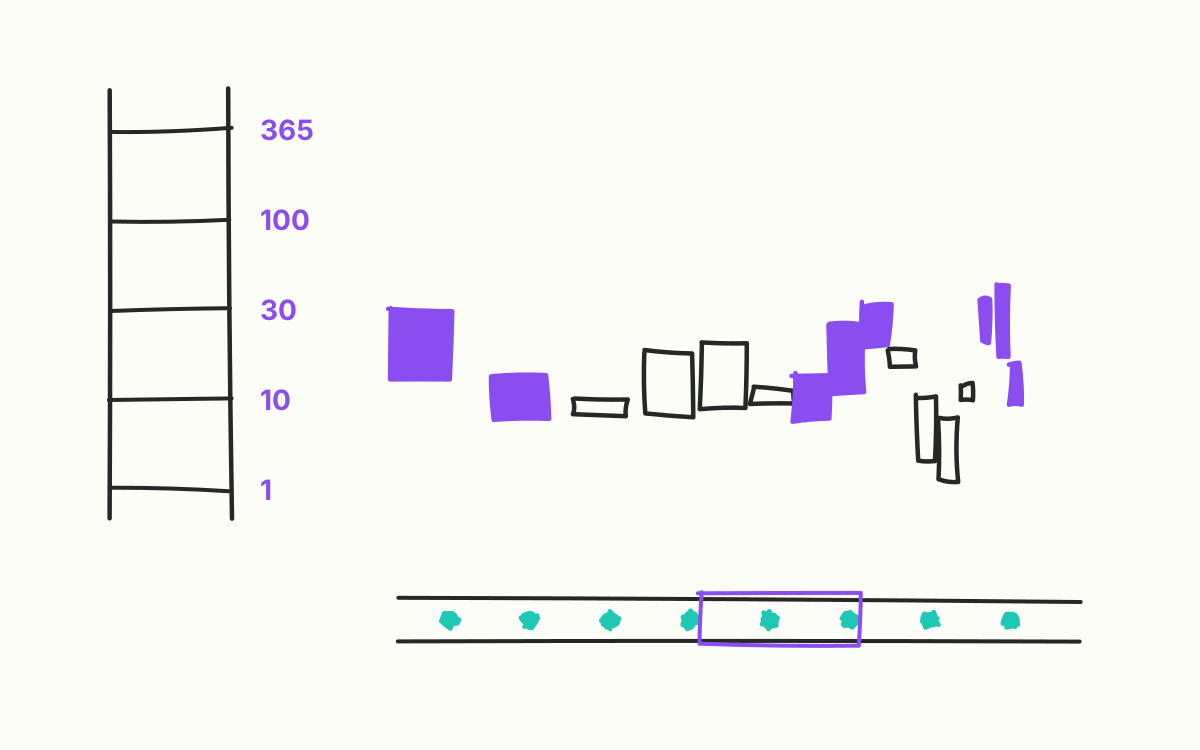
“Could you send me yesterday’s view again?” In many analytics tools that is a small disaster: set the filters again, pick the period again, hope it is the same view. In Pythia it is a copied link.
This month the timeline became Pythia’s home page – and the place where almost every question begins.
One view for every period
The timeline shows revenue, units, lines or margin as candles over time. A zoom ladder leads from the year through 100, 30 and 10 days down to a single day. Anyone looking at a year chooses which year is meant: the last twelve months, the calendar year or the financial year. The title line states the window in words, so nobody has to guess what they are looking at.
Instead of two date fields there is a period picker: year, financial year, quarter, month, custom or all. Running periods end today, completed ones at the end of the period. One click is enough to jump from the current quarter to the same quarter last year.
Comparison is the default
Every candle is compared – to begin with against last year, shifted by 52 weeks so that weekdays line up. That makes the timeline not a picture of the past but a tool for finding deviations.
Comparison is what turns a chart into an analysis tool.
Breaking things down without leaving the view
Every candle can be split: by channel, cluster, product group, family or item. A click on a segment filters one level deeper, and a breadcrumb trail shows the way back. If you want to know which channel the weak March came from, you don’t need a second report.
There are also two time axes. Order intake shows demand: when customers ordered. Receipt date shows the financial view: when it was invoiced. Both have their place – and between them often lie exactly the days that distort a monthly report.
The year strip
Below the timeline is a narrow overview of the whole year. A click on it moves the window without changing its length. That way the same 30-day section can be slid through the year until the striking spot is found.
Every view is a link
Period, zoom, comparison, split, filters – it is all in the address. A copied link opens exactly the same view for a colleague. The browser’s back button restores the previous state. And anyone switching from the timeline to a report takes the period with them.
Next month: filter the way you think – asking questions without writing a query.